#1714Keyboarding
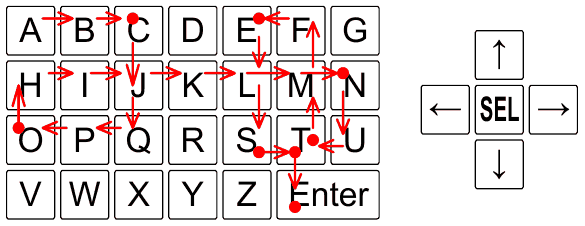
★★★★How many keystrokes are necessary to type a text message? You may think that it is equal to the number of characters in the text, but this is correct only if one keystroke generates one character. With pocketsize devices, the possibilities for typing text are often limited. Some devices provide only a few buttons, significantly fewer than the number of letters in the alphabet. For such devices, several strokes may be needed to type a single character. One mechanism to deal with these limitations is a virtual keyboard displayed on a screen, with a cursor that can be moved from key to key to select characters. Four arrow buttons control the movement of the cursor, and when the cursor is positioned over an appropriate key, pressing the fifth button selects the corresponding character and appends it to the end of the text. To terminate the text, the user must navigate to and select the Enter key. This provides users with an arbitrary set of characters and enables them to type text of any length with only five hardware buttons. In this problem, you are given a virtual keyboard layout and your task is to determine the minimal number of strokes needed to type a given text, where pressing any of the five hardware buttons constitutes a stroke. The keys are arranged in a rectangular grid, such that each virtual key occupies one or more connected unit squares of the grid. The cursor starts in the upper left corner of the keyboard and moves in the four cardinal directions, in such a way that it always skips to the next unit square in that direction that belongs to a different key. If there is no such unit square, the cursor does not move.
範例輸入 1
4 7
ABCDEFG
HIJKLMN
OPQRSTU
VWXYZ**
CONTEST
5 20
12233445566778899000
QQWWEERRTTYYUUIIOOPP
-AASSDDFFGGHHJJKKLL*
--ZZXXCCVVBBNNMM--**
--------------------
ACM-ICPC-WORLD-FINALS-2015
2 19
ABCDEFGHIJKLMNOPQZY
X*****************Y
AZAZ
6 4
AXYB
BBBB
KLMB
OPQB
DEFB
GHI*
AB
範例輸出 1
30
160
19
7
Pro 專屬功能: 查看這題在歷屆 CPE 出現過幾次 — 升級以解鎖.